How to Screenshot an Entire Webpage
Chrome only screenshots what fits on screen. Anything below the fold is lost, and the usual workarounds — stitching several shots by hand, or printing to PDF — either misalign or reflow the page into something that no longer looks like the site.
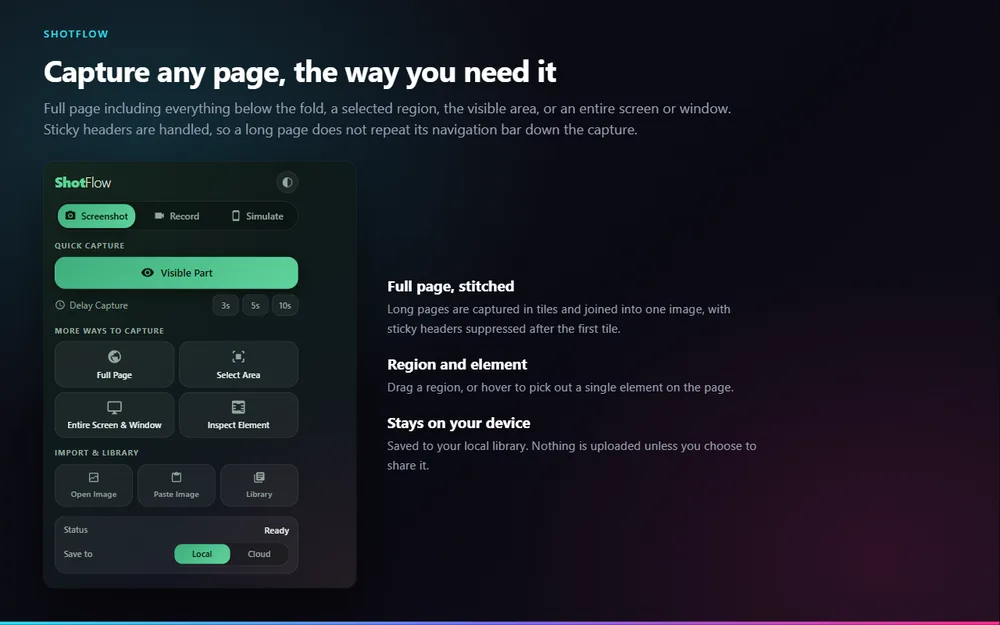
How to do it
Open the page you want to capture
Scroll to the top. ShotFlow handles the scrolling itself, so you do not need to position anything.
Click the ShotFlow icon, then Full Page
It is under "More ways to capture". The page scrolls itself while each tile is taken.
Wait for the tiles to stitch
Scrolling through the page triggers lazy-loaded images along the way, so they appear in the capture instead of showing as blank boxes.
Annotate or save
The finished image opens in the editor. Add arrows or numbered steps, or download it straight away as PNG, JPG or PDF.
What makes it different
Sticky headers handled
A fixed navigation bar is suppressed after the first tile, so it appears once at the top instead of repeating every screen down the image.
Lazy images triggered
Because the capture actually scrolls the page, images that only load when they come into view are loaded before their tile is taken.
Nothing is uploaded
The capture is stitched in your browser and saved to a local library. It only leaves your device if you press Share.
Full page screenshot, free and without an account
Nothing you capture leaves your browser unless you choose to share it.
Add to ChromeQuestions
How do I screenshot a whole webpage in Chrome?
Install ShotFlow, click its toolbar icon, and choose Full Page. The extension scrolls the page, captures it in tiles, and joins them into a single image which opens in the editor. No account and no watermark.
Why does my full page screenshot repeat the header?
Most tools screenshot the visible area repeatedly while scrolling, so anything with position: fixed — a navigation bar, a cookie banner — is captured in every tile. ShotFlow suppresses fixed elements after the first tile so they appear once.
Do images that load on scroll appear in the capture?
Yes. The capture scrolls the real page, which triggers lazy loading the same way a human scrolling would. Images have loaded by the time their tile is taken.
What formats can I save as?
PNG, JPG or PDF, or copy the image straight to the clipboard. There is no export limit and no watermark on any of them.
Is there a page length limit?
There is no fixed limit. Very long pages produce very large images, and the capture is held in your browser while it is stitched, so extremely long pages are bounded by available memory rather than by a setting.
Also in ShotFlow
Blur & redact
Hide an email address, a name or an account number in a screenshot or video.
Read more →Device mockups
Drop a capture into a phone, tablet or laptop frame on a chosen backdrop, in flat or isometric perspective.
Read more →Extract text
Pull selectable text out of a screenshot, a scanned page or an image where text cannot be copied.
Read more →