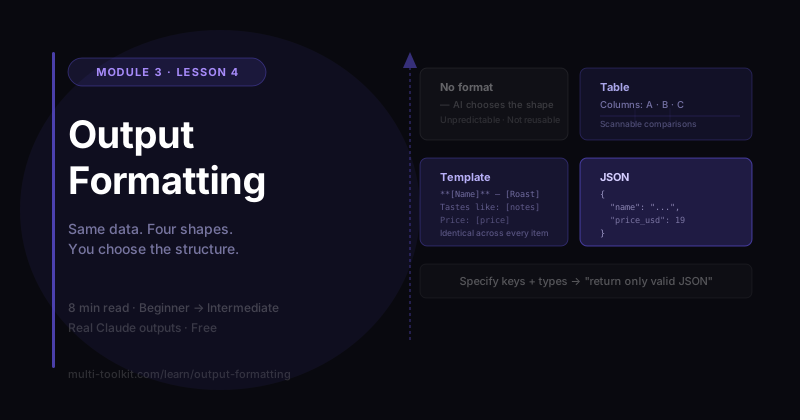
You'll learn: how to specify the exact output format — tables, strict templates, or JSON — so AI answers are consistent, scannable, and ready to use or automate. You'll walk away with: the Output Formatting Toolkit — the format menu + the JSON & template patterns. Level: Beginner → Intermediate · Prereq: Turn a weak prompt into an expert one
Every example below is a real, unedited Claude (Sonnet 4.6) response from June 2026. Same data — three coffees — formatted four different ways.
1. The Problem
You ask AI for something useful and get back a wall of text you then have to chop into a table, a list, or a tidy template by hand. The content was fine; the shape was wrong.
Here's the fix most people skip: you can specify the exact format you want, and the AI will deliver it — a comparison table, a strict template repeated for every item, even clean JSON you can feed into a spreadsheet or your website. Same content, the shape you actually need.
Our data for all four runs:
Our three coffees:
- Ethiopian Yirgacheffe — light roast — blueberry, citrus, tea-like — $19
- Colombian Huila — medium roast — caramel, red apple, cocoa — $17
- Sumatra Mandheling — dark roast — dark chocolate, cedar, earthy — $18
2. Beginner Example — What "No Format" Gets You
[the data] … Tell me about them so a customer can choose.
What happened: modern Claude didn't just dump a paragraph — it produced nicely designed cards (it even added a "most popular" badge) plus a prose decision guide: "If they like bright, tea-style drinks → the Yirgacheffe… if they want something bold → the Sumatra."
Impressive! But here's the catch: the AI chose that structure, not you. That's a problem for three reasons:
- It's unpredictable — ask again tomorrow and you might get a totally different shape.
- It may not fit where you need it (a spreadsheet? a database? a uniform set of cards?).
- You can't reuse it reliably across many items.
Leaving the format unspecified means handing the AI the steering wheel. Let's take it back.
🔑 No format = the AI's choice. It might look great — but "looks great once" isn't the same as "the exact shape I need, every time."
3. Intermediate Example — Ask for a Table
[the data] … Present them as a comparison table with these columns:
Coffee, Roast, Tasting notes, Best for, Price.
What happened: a clean, scannable comparison table — exactly those columns. It even filled the "Best for" column intelligently (Yirgacheffe → "Pour-over lovers… bright, fruit-forward cups"), inferring it from the flavor profiles.
| Coffee | Roast | Tasting notes | Best for | Price |
|---|---|---|---|---|
| Ethiopian Yirgacheffe | Light | Blueberry, citrus, tea-like | Bright, fruit-forward cups | $19 |
| Colombian Huila | Medium | Caramel, red apple, cocoa | Balanced, crowd-pleasing | $17 |
| Sumatra Mandheling | Dark | Dark chocolate, cedar, earthy | Bold, full-bodied | $18 |
Naming the columns is the whole trick. You decided the shape; the AI filled it.
🔑 Tables: say "as a table with columns: X, Y, Z." Instant, scannable comparisons.
4. Advanced Example — A Strict, Repeatable Template
When you need every item in an identical shape (cards, listings, entries), give a template and say "use EXACTLY this."
[the data] … Format each coffee as a product card using EXACTLY this template:

**[Name]** — [Roast]
Tastes like: [notes]
Best brewed: [method]
Price: [price]
In one line: [a short Brew Lab-style one-liner]
What happened: all three came out in the same structure, with on-brand one-liners:
"Like a morning in Addis Ababa — floral, bright, and gone too soon." "The crowd-pleaser that never had to try — smooth, warm, and always right." "For those who want their coffee to mean it."
Now it's consistent and reusable — paste in 50 products and every card matches.
🔑 Strict templates: "use EXACTLY this template" → identical structure across every item.
5. Power Move — Ask for JSON
This is the one that unlocks automation. Ask for JSON and you get machine-readable data you can drop straight into a website, spreadsheet, or workflow:
[the data] … Return the data as a JSON array. Each object must have these keys:
name, roast, tasting_notes (array of strings), best_brew_method, price_usd (number),
tagline. Return only valid JSON — no extra text.
Real output:
[
  {
    "name": "Ethiopian Yirgacheffe",
    "roast": "light",
    "tasting_notes": ["blueberry", "citrus", "tea-like"],
    "best_brew_method": "Pour over",
    "price_usd": 19,
    "tagline": "Bright and delicate with a fruit-forward finish"
  }
]
Two things made this work:
- Name the keys and types ("
price_usd(number)", "tasting_notes(array of strings)") so the structure is exactly what your system expects. - "Return only valid JSON — no extra text" stops the AI from wrapping it in chatty commentary.
This is the bridge to real automation — feed AI output into other tools without copy-pasting.
🔑 JSON: specify keys + types and "return only valid JSON." Now the output is data, not just text.
6. ⚠️ Watch the Inferred Fields
Notice the table had a "Best for" column and the JSON had best_brew_method — neither was in our original data. The AI filled them by inference. They're reasonable, but they're guesses, not facts you gave it.
This is the same gap-filling behavior from Context Prompting: when your format asks for a field your data doesn't contain, the AI invents a plausible value. Verify inferred fields before you publish or pipe them into a system.
7. Common Mistakes
| Mistake | Why it happens | The fix |
|---|---|---|
| Leaving format unspecified | We focus on content, not shape | State the format: table / template / JSON |
| Vague format ("make a list") | Too open | Specify columns, fields, or an exact template |
| Asking for JSON without keys | The AI guesses the schema | Name every key and its type |
| Forgetting "only valid JSON" | The AI adds commentary that breaks parsers | Add "return only valid JSON, no extra text" |
| Trusting inferred fields | Format asks for data you didn't supply | Verify any field the AI filled in |
8. Templates (Your Take-Home)
Table: Present this as a table with columns: [A], [B], [C].
Strict template:
Format each [item] using EXACTLY this template:
[your template with [placeholders]]
JSON:
Return the result as a JSON array. Each object must have these keys:
[key (type), key (type), ...]. Return only valid JSON — no extra text.
📥 Download the Output Formatting Toolkit (free) — the full format menu (prose / list / table / template / JSON / markdown) with when-to-use. (Email opt-in.)
9. Your Challenge
Do this now: take any list you have (tasks, products, contacts). Ask the AI to return it three ways — a table, a strict template, and JSON with named keys.
You did it right if: the JSON is clean enough to paste into a spreadsheet — and you spotted any field the AI inferred rather than pulled from your data.
Keep going: ← Pillar: Upgrade a Prompt · Siblings: Role Prompting · Context Prompting · Few-Shot Examples · Start the Starter Course →