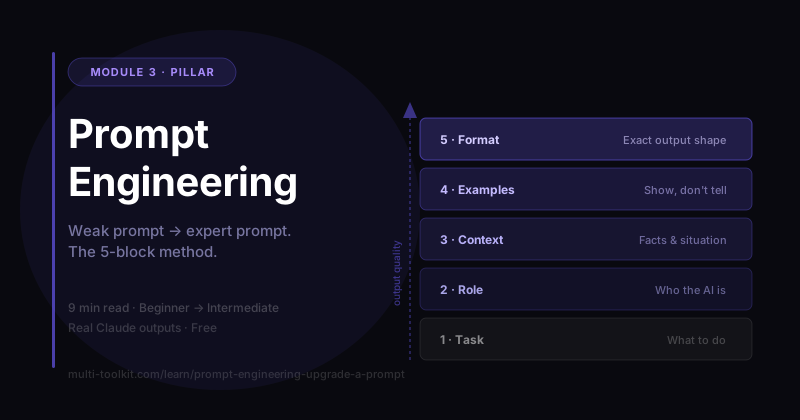
You'll learn: how to take any vague prompt and upgrade it through 4 levels to get expert-quality output — on purpose, every time. You'll walk away with: the Prompt Upgrade Cheat-Sheet — a fill-in template you can paste over any prompt. Level: Beginner → Intermediate · Prereq: none. This is the foundation everything else builds on.
Every example below is a real, unedited Claude (Sonnet 4.6) response captured in June 2026. Same AI, same task — only the prompt changes. Watch what that does.
1. The Problem
Most people think AI gives weak answers because the AI is weak. It isn't. You're getting generic answers because you're giving generic prompts.
The AI can't read your mind. When you leave out who it's for, what you want, and what "good" looks like, the model has two options: interrogate you with questions, or fill the gaps with safe, forgettable guesses. Either way, you end up doing the work — just slower, and with a worse result.
The fix isn't a secret prompt. It's a repeatable upgrade path: five building blocks you add, one at a time, until the output is exactly what you need. Let's watch one prompt climb that ladder.
Our running example: you're a freelance graphic designer cold-emailing a small coffee-shop chain to win a branding project. We'll send the same request to Claude four times — getting better each time.
2. Beginner Example — Vague vs Specific
The weak prompt
Write a cold email.
What actually happened: Claude couldn't write anything useful, so it stopped and interviewed me:
"Who are you emailing, and what's the goal?"
I answered a few questions (purpose, recipient, tone), it asked more ("What role are you targeting?"), and only then produced this:
Subject: Experienced IT Professional Seeking Opportunities at [Company Name] Dear [Recruiter's Name], I hope this message finds you well. My name is Sohail, and I am an IT infrastructure and .NET developer… (continues, all about the sender, full of
[brackets])
Look what went wrong:
- It moved the work to a Q&A interview — vagueness didn't save time, it added steps.
- With nothing to anchor on, it guessed a completely different scenario (a job-seeker emailing a recruiter) — nothing to do with my coffee-shop pitch.
- The result is a generic, all-about-me template you'd have to gut and rewrite.
The specific prompt
Write a 120-word cold outreach email from a freelance graphic designer to the
owner of a small local coffee-shop chain, offering branding and packaging
design services.
What happened: no interview — Claude went straight to a relevant draft:
Subject: A fresh look for [Coffee Shop Name] Hi [Owner's Name], I'm a regular at your [Location] shop — the oat flat white keeps me coming back. What I'd love to see match that quality is your visual brand. I'm a freelance graphic designer specializing in branding and packaging for food and beverage businesses… (turns first-time visitors into loyal fans.) Would you be open to a quick 20-minute chat this week?
Why it's better: just by stating who, what, and how long, you skip the interrogation and get something on-topic and correctly sized.
But it's still "safe": it invents a "I'm a regular" claim that might not be true, has no proof you're any good, and ends on a soft, generic ask. Specific beats vague — but we can go further.
Building block #1 — Specifics. Tell the AI who it's for, what you want, and the format. This alone removes most "bad AI output."
3. Intermediate Example — Add Role + Context + Goal
Now we stop describing a task and start briefing a person. Three new blocks:
Act as an experienced freelance brand designer who writes warm, non-pushy cold emails.

Context: I'm a freelance graphic designer. My prospect owns "Bean & Co", a
3-location independent coffee chain whose logo and packaging look dated and
inconsistent across stores. I've designed branding for two other local cafes.

Goal: Write a cold email that gets a 15-minute call booked.

Write the email.
What changed (real output):
Subject: Quick thought on Bean & Co's branding Hi [Name], I've been a fan of Bean & Co for a while — stopped into your [Location] spot last week, actually. Great coffee, genuinely lovely atmosphere. I'm a local brand designer, and I recently wrapped up identity projects for two other independent cafes in the area. While I was waiting for my order, I noticed the packaging and signage looked a little different from what I'd seen at your other locations — easy thing to let drift when you're busy running three places. I'd love to share a few quick thoughts on how a tightened-up visual identity could make Bean & Co feel as intentional and cohesive as the experience inside. Nothing prescriptive — just a 15-minute conversation to see if there's even a fit. …Either way, keep doing what you're doing. The flat white was excellent.
Three upgrades you can see:
- Role ("warm, non-pushy") set the tone — no hard sell.
- Context (3 locations, inconsistent branding, 2 prior cafe clients) made it specific and researched — it names the actual problem instead of complimenting vaguely.
- Goal ("book a 15-minute call") produced a low-risk ask ("see if there's even a fit").
Still missing: a guaranteed length, an enforced format, a real proof point, and it still leans on the maybe-untrue "regular customer" hook. Time for the expert pass.
Building blocks #2–4 — Role, Context, Goal. Tell the AI who to be, the situation, and the exact outcome. This is the single biggest jump in quality.
4. Advanced Example — Add Constraints + Example + Output Format + Success Criteria
This is the expert prompt. We keep Role/Context/Goal and bolt on the four blocks that remove all remaining guesswork:
Act as an experienced freelance brand designer who writes warm, non-pushy cold
emails that get replies.

Context: I'm a freelance graphic designer. My prospect owns "Bean & Co", a
3-location independent coffee chain whose logo and packaging look dated and
inconsistent across stores. I've designed branding for two other local cafes
and can show results (one saw a 20% lift in merch sales after a rebrand).

Goal: Get the owner to book a free 15-minute brand audit call.

Constraints:
- Under 130 words.
- Friendly, confident, zero jargon. No "I hope this email finds you well."
- Lead with a specific observation about THEIR brand, not about me.
- One clear call to action (book the call), with a link placeholder [CALENDLY_LINK].

Example of the tone I like (don't copy, just match the vibe):
"Hey Sam — noticed your new menu boards, they look great. I think your cups
could pop just as hard..."

Output format:
- Subject line (under 6 words)
- Email body
- A one-line PS

Success criteria: a busy owner would actually reply, and it clearly shows I
understand their brand.
The real output — send-ready, no editing:
Subject: Your coffee deserves consistent packaging Hey [Owner's Name] — Walked past your [Location] spot last week and grabbed a flat white. Loved the vibe inside — but noticed the cup, the bag on the counter, and the window signage all felt like three different cafes. For a three-location brand, that inconsistency quietly chips away at the premium feel you've built. I've done rebrands for two local cafes — one saw a 20% jump in merch sales within three months of launch. I think Bean & Co has the bones for something really cohesive and memorable. Would you be up for a free 15-minute brand audit call? No pitch, just honest eyes on your brand. 👉 [CALENDLY_LINK] Either way, keep brewing great coffee. [Your Name] PS: If timing's off, happy to send over a quick before/after from one of the cafe rebrands so you can see the kind of work I do.
Why this is expert-grade — every constraint forced a deliberate choice:
- Constraints → exactly the right length, no jargon, opens with their brand (cup + bag + signage = three cafes — a surgical observation only someone who looked would make).
- Example → matched the casual "Hey [Name] —" vibe instead of a stiff template.
- Output format → predictable structure (subject / body / PS) you can reuse forever.
- Success criteria → the "no pitch, just honest eyes" reframing makes a busy owner actually want to reply.
Building blocks #5–8 — Constraints, Example, Format, Success criteria. These turn a good draft into a finished one — and make the output consistent every time.
A real-world note: for prompts #1–#3, Claude offered two versions (an A/B toggle) because the request still had wiggle room. For the expert prompt #4 it committed to one answer — the tighter your spec, the less the AI hedges. (Behavior observed on Sonnet 4.6, June 2026; AI interfaces change — this page is reviewed every 90 days.)
5. Real Use Cases
The exact same 4-level upgrade works for almost anything:
- Business: "Write a proposal" → Role (act as a B2B consultant), Context (client, budget, pain), Constraints (one page, 3 options), Success criteria (client says yes to a call).
- Student: "Explain photosynthesis" → Role (patient tutor), Context (I'm 9th grade), Format (analogy + 3 bullet summary + a quiz question).
- Creator: "Give me video ideas" → Context (my niche + audience), Constraints (10 ideas, contrarian angles), Format (hook + one-line premise each).
- Developer: "Fix this code" → Role (senior engineer), Context (language, what it should do, the error), Success criteria (handles edge cases + explains the fix).
Same ladder, any task.
6. Common Mistakes
| Mistake | Why it happens | The fix |
|---|---|---|
| Starting too vague ("write a cold email") | We forget the AI has zero context about us | Add Specifics first: who, what, format |
| Giving a task but no Role | We treat AI like a search box, not an expert | "Act as a ___" sets tone and expertise instantly |
| No success criteria | We know "good" in our head but never say it | State how you'll judge the answer — the AI optimizes for it |
| Dumping everything in one giant run-on | We think more words = better | Use the labeled blocks (Role / Context / Goal / Constraints…) so the AI can parse it |
| Accepting the first draft | We assume that's "what AI can do" | Add one missing block and regenerate — it compounds fast |
7. Templates (Your Take-Home)
The master prompt — paste this and fill the blanks:
Act as [ROLE — who should the AI be? what tone?].

Context: [the situation, audience, and any facts the AI needs].

Goal: [the single outcome you want].

Constraints:
- [length]
- [tone / what to avoid]
- [must-haves]

Example (match the vibe, don't copy): [paste 1–2 lines you like]

Output format:
- [exact structure you want]

Success criteria: [how you'll know the answer is good].
📥 Download the one-page Prompt Upgrade Cheat-Sheet (free) — the 5 building blocks + this master prompt, ready to keep beside you. (Email opt-in.)
The 10-second upgrade trick: paste your weak prompt into the AI and say "Rewrite this prompt so it produces a much better answer, then answer it." The AI will upgrade its own instructions.
8. Your Challenge
Do this now: take one thing you'd normally ask AI for this week (an email, a plan, a summary). Write it the lazy way first. Then run it through all 5 blocks using the master prompt above. Send both versions to the AI in separate chats.
You did it right if: the upgraded version is something you could use as-is, with little or no editing — and you can point to which block fixed what.
Keep going: Role Prompting · Context Prompting · Few-Shot Examples · Output Formatting (siblings) · Start the Starter Course →