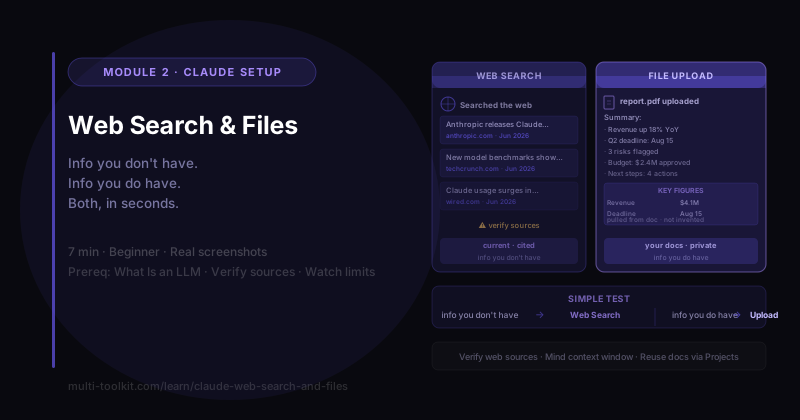
You'll learn: how to extend Claude past its training data — pulling live info from the web and reading your own documents — and the limits to watch. You'll walk away with: the Feed-Claude Guide — web search vs files, when to use each, and the cautions. Level: Beginner, hands-on · Prereq: What Is an LLM
⏱️ Screenshots from the Claude Team plan, June 2026. Controls move over time; the workflow is what matters. (Reviewed ~every 60 days.)
1. The Problem
Two myths keep people from trusting AI:
- "It only knows old stuff" (true of the raw model — it has a training cutoff).
- "It only knows what I type into the box" (also true by default).
Both have a fix. Claude can search the web for current information, and it can read files you upload. From the foundations lessons: the model is limited to its training plus the context window — these two features blow past both. (And both are app features layered on the model — the model-vs-app idea again.)
2. Web Search — Live, Sourced Information
Ask for something current and tell Claude to look it up:
"Use web search: what are the most recent updates from Anthropic about Claude in the last few weeks? Give me 3, each with a source link and date."
Claude showed a "Searched the web" step, then returned three recent items — each with a date and a clickable source link:
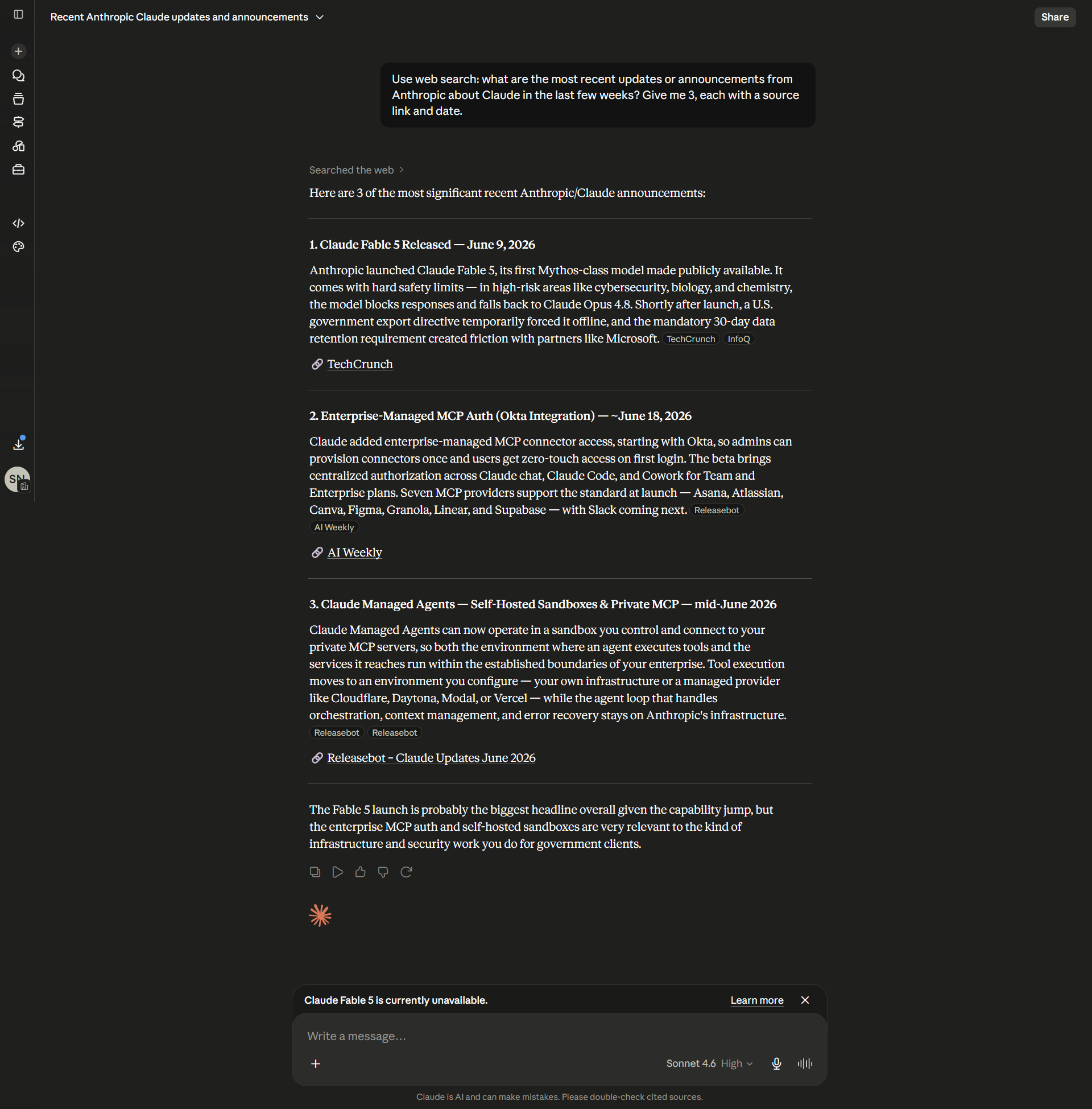
That's information that didn't exist when the model was trained — fetched live, with citations you can check.
But read the fine print (Claude prints it too): "double-check cited sources." Web search dramatically reduces guessing, but the AI can still misread a source or surface a wrong one. So the rule from the hallucinations lesson still holds — click the links and verify anything that matters.
🔑 Web search = current + cited. Use it for anything recent — then verify the sources yourself.
3. File Upload — Claude Reads Your Documents
The other direction: give Claude information you have. Click the attach (📎/+) control, add a file (PDF, doc, spreadsheet, even an image), and ask a question about it.
I uploaded a 2-page document and asked:
"Summarize this document in 5 bullet points and pull out any key numbers or dates."
Claude read the whole file and returned five tight bullets plus a clean table of the key figures and dates — pulled straight from the document, not invented:
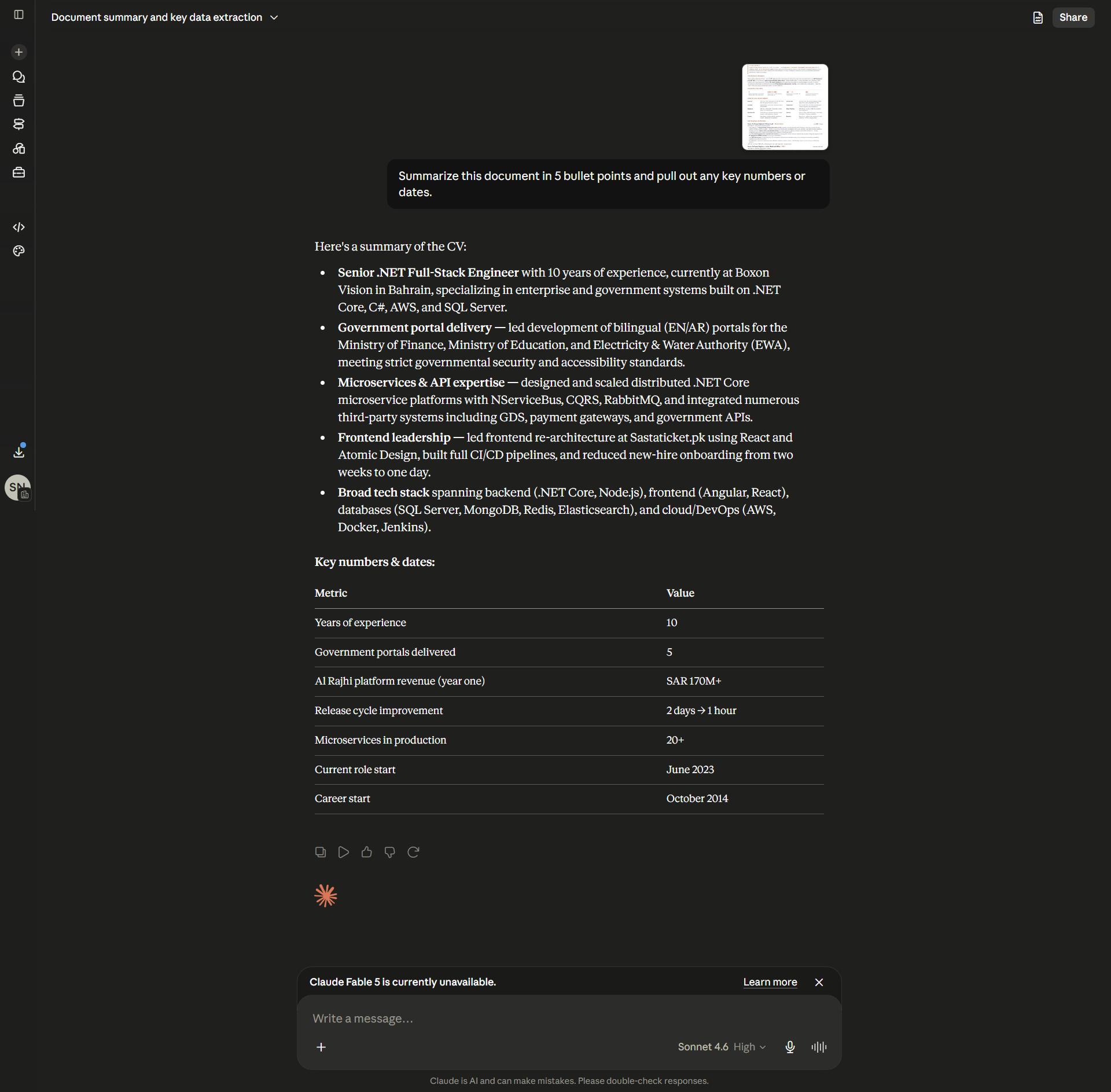
This is one of the highest-value everyday uses of AI: summarizing reports, pulling data out of PDFs, answering questions across a long document in seconds.
🔑 Upload a file and Claude can read, summarize, extract, and analyze it. Great for reports, PDFs, data, and images.
4. When to Use Which
| Use Web Search when… | Use File Upload when… |
|---|---|
| You need current/external info | You need to work with your own info |
| News, releases, prices, recent events | Summarize/extract from a report or PDF |
| Facts past the training cutoff | Q&A over a document you have |
| You want sources to cite | The info isn't (or shouldn't be) public |
Simple test: web search = info you don't have. Files = info you do have.
5. The Limits (read before you rely on it)
- Verify web sources. A citation isn't a guarantee — open it and check. (Search reduces hallucination; it doesn't remove it.)
- Mind the context window. An uploaded file goes into the window — very large files can hit limits or lose detail. See Context Windows.
- Don't upload confidential data to chats you don't control. For sensitive work, follow your org's rules.
- Reusing the same docs? Don't re-upload every chat — put them in a Project so they're always available.
6. Common Mistakes
| Mistake | Fix |
|---|---|
| Trusting cited web facts without clicking through | Open the source and verify |
| Asking about recent events without web search | Turn search on / say "use web search" |
| Describing a document instead of attaching it | Upload the actual file |
| Uploading a huge file and expecting perfect recall | Trim it, or split it; watch the context window |
| Re-uploading the same files every session | Put them in a Project |
7. Your Takeaway
The model is limited to its training and what's in the window — but the app isn't. Web search adds live, cited info; file upload lets Claude read your documents. Use search for info you don't have and files for info you do — and verify web sources before you rely on them.
📥 Download the Feed-Claude Guide (free) — web search vs files, when/how, and the cautions. (Email opt-in.)
8. Your Challenge
Do this now:
- Ask Claude something that happened this week, with "use web search," and click one source to verify it.
- Upload a (non-sensitive) document and ask for a 5-bullet summary + key numbers.
You did it right if: you got a current answer you could trace to a real source, and a summary that pulled real details out of your file — and you can say which feature you'd use for "info I have" vs "info I need."
Keep going: ← Claude Projects · Siblings: Claude Artifacts · Extended Thinking · Back to foundations: Hallucinations · Context Windows